Skip to content

Localisation: Romania · e‑TVA VAT reconciliation

Your books next to the pre‑filled return.

For companies operating in Romania. RDCopilot e‑TVA sets the pre-filled VAT return from SPV against your sales and purchase journals, row by row. Every difference gets a reason and its documents, ready for your accountant to review.

Setup + monthly licence · EU hosting · Support in Romanian

CIF RO········ · Period: August 2026 · Monthly filer Example data4 of 8 lines
Example data: August 2026 VAT amounts in RON
Your recordsSales & purchase journals Your records, RON ΔDifference and status Pre-filled RO e‑TVA, RON Pre-filled RO e‑TVAReceived 03.10.2026
Collected VAT
rd. 9 Sales at 21% 184,260.00 +2,520.00To explain 181,740.00 RO e‑Factura · 1 invoice dated in September
rd. 12 Reverse-charge purchases, VAT collected 18,300.00 +650.00To explain 17,650.00 RO e‑Factura · grouped under domestic
Deductible VAT
rd. 24 Domestic purchases at 21% 96,880.40 −2,222.001 of 2 explained 99,102.40 RO e‑Factura · 2 differences
rd. 26.1 Reverse-charge purchases, VAT deductible 18,300.00 +650.00To explain 17,650.00 RO e‑Factura · grouped under domestic
Whole period, 8 lines
Collected VAT Δ +7,790.00 Deductible VAT Δ +3,048.00 Payable Δ +4,742.00
Collected VAT
Your records 227,505.20Pre-filled 219,715.20Difference +7,790.00
Deductible VAT
Your records 119,800.40Pre-filled 116,752.40Difference +3,048.00
VAT payable
Your records 107,704.80Pre-filled 102,962.80Difference +4,742.00
Open all 8 lines in the desk

01 / Desk

Start from the difference, not the total.

Choose a row with a difference. The desk opens both sides down to document level and suggests the likely cause. You record the explanation, attach the evidence and send it to review. Source amounts are never edited.

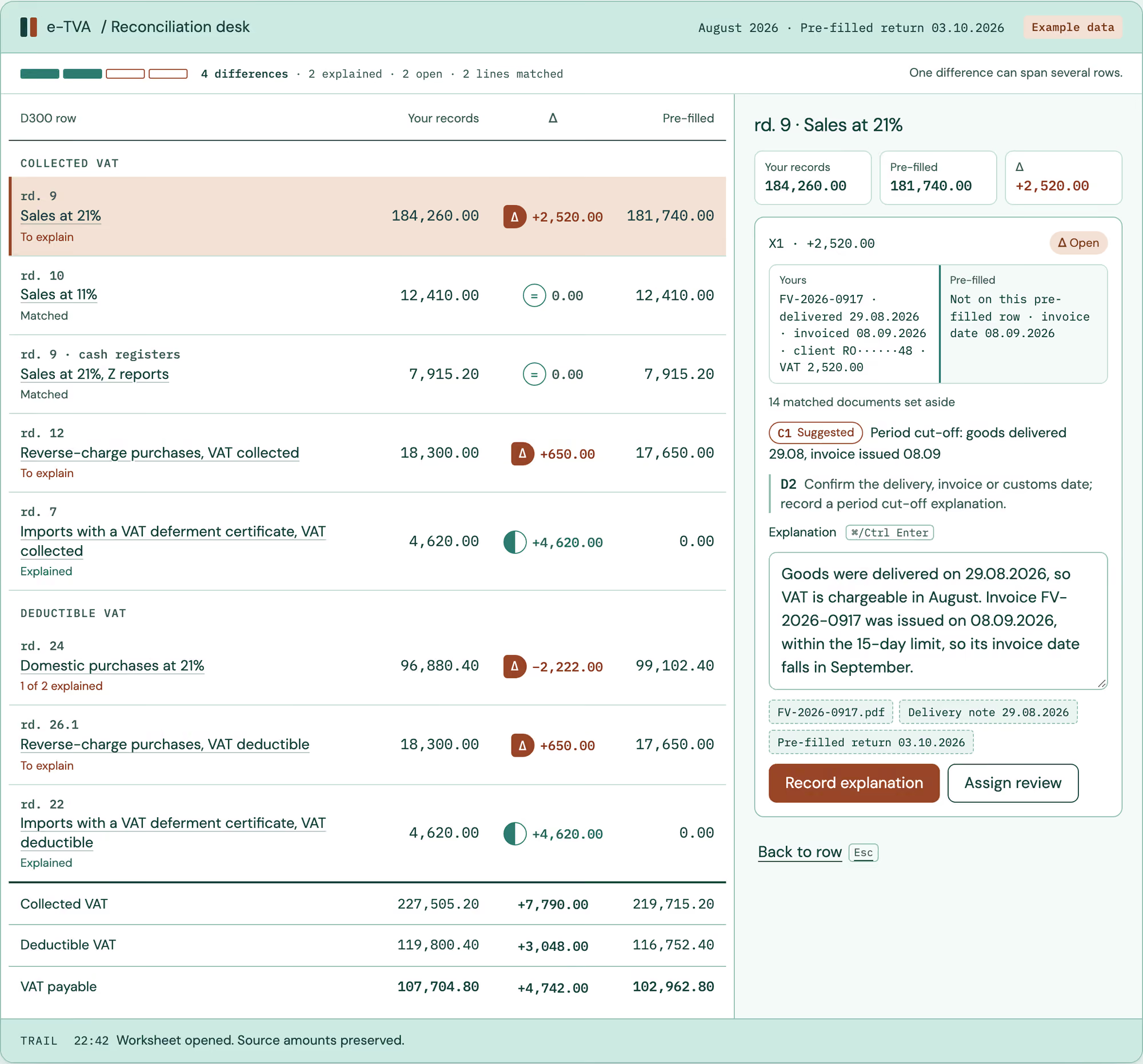
e‑TVA / Reconciliation desk August 2026 · Pre-filled return 03.10.2026 Example data
4 differences · 2 explained · 2 open · 2 lines matched One difference can span several rows.
Example data: all 8 comparison lines for August 2026, in RON, with their D300 rows. Choose a line to open its explanation drawer.
D300 row Your records Δ Pre-filled
Collected VAT
184,260.00 +2,520.00 181,740.00
12,410.00 0.00 12,410.00
7,915.20 0.00 7,915.20
18,300.00 +650.00 17,650.00
4,620.00 +4,620.00 0.00
Deductible VAT
96,880.40 −2,222.00 99,102.40
18,300.00 +650.00 17,650.00
4,620.00 +4,620.00 0.00
Collected VAT227,505.20+7,790.00219,715.20
Deductible VAT119,800.40+3,048.00116,752.40
VAT payable107,704.80+4,742.00102,962.80

rd. 9 · Sales at 21%

Your records
184,260.00
Pre-filled
181,740.00
Δ
+2,520.00
X1 · +2,520.00 Open
  • YoursFV-2026-0917 · delivered 29.08.2026 · invoiced 08.09.2026 · client RO······48 · VAT 2,520.00Pre-filledNot on this pre-filled row · invoice date 08.09.2026

14 matched documents set aside

C1 Suggested Period cut-off: goods delivered 29.08, invoice issued 08.09

D2 Confirm the delivery, invoice or customs date; record a period cut-off explanation.

  • FV-2026-0917.pdf
  • Delivery note 29.08.2026
  • Pre-filled return 03.10.2026
Trail
  1. Worksheet opened. Source amounts preserved.

This desk runs in your browser with example data. Nothing is sent to ANAF and no source record changes. Row numbers refer to the D300 form (OPANAF 174/2026).

02 / The obligation

What ANAF sends, and what it expects from you.

For every VAT-registered business, ANAF sends a pre-filled VAT return (decont precompletat RO e‑TVA) to the Private Virtual Space (SPV) for each tax period. It is assembled from data the authority already holds, including RO e‑Factura, RO e‑Transport, electronic cash registers, customs data, D394, D390 and RO e-SAF-T.

It arrives by the 5th of the month after the D300 deadline, so you compare it with a return you have already filed. Every row names the sources behind it, and you can request the underlying data reports from ANAF electronically.

The pre-filled return does not replace your D300 and is not a tax claim (titlu de creanță). You still file your own return, and ANAF identifies the differences between the two in its RO e‑TVA analysis module.

  1. 1File D300 by the 25th from your own journals.
  2. 2By the 5th of the next month, the pre-filled return arrives in SPV. Compare it row by row.
  3. 3Explain every difference with its documents and carry any correction into a later D300.
  1. RO e‑Factura invoices
  2. RO e‑Transport declarations
  3. Electronic cash registers (RO e-Case de marcat)
  4. Customs data from the Romanian Customs Authority
  5. Informative statement D394
  6. Recapitulative statement D390 (VIES)
  7. RO e-SAF-T (D406)
SPVPre-filled returnRO e‑TVA
YoursD300from your journals
Main data sources behind the pre-filled return, compared with your D300.

03 / Causes

Most differences have an ordinary reason.

A difference is not an error by default. These are the causes we see most often, from period cut-off to reverse charge, and each one leaves a trace you can document.

  • C1

    Period cut-off

    Goods delivered at month end can be invoiced up to the 15th of the next month, so the invoice lands in a different period from the VAT in your books.

    books > pre-filled
    See the action · Period cut-off
  • C2

    Credit notes

    Goods are returned in one period and the supplier’s credit note is dated in another, or it is still missing.

    either side
    See the action · Credit notes
  • C3

    Reverse charge

    You record reverse-charge VAT as both collected and deductible. If the supplier’s e-invoice shows a different VAT treatment, the pre-filled return can place it elsewhere. Both you and the supplier must be VAT-registered.

    row shift, both sides
    See the action · Reverse charge
  • C4

    Cash-basis VAT

    Under the cash-basis system, VAT becomes due when the supplier collects payment, and the buyer deducts it only after paying.

    timing
    See the action · Cash-basis VAT
  • C5

    Rows grouped differently

    The same amount is mapped to another D300 row, rate or operation type.

    row shift
    See the action · Rows grouped differently
  • C6

    Customs

    Import VAT, including imports under a deferment certificate recorded on both sides, may appear later, on another row or not at all in the pre-filled return.

    books > pre-filled
    See the action · Customs
  • C7

    Cash registers

    Cash-register and e‑Factura data both feed the pre-filled return; a receipt later invoiced must be counted once.

    either side
    See the action · Cash registers
  • C?

    Something else

    A difference with no known cause stays open in the desk until someone writes down what it is. Nothing is closed by default.

    Back to the desk

04 / Method

Compare. Explain. Archive. For every D300 row, every period.

  1. 01

    Compare

    The pre-filled return and your journals are aligned on the same period, the same CIF and the same D300 rows. Matched rows close themselves; only differences stay open.

    • Dated copy of each pre-filled return
    • Document-level drill-down
    • Matched rows set aside
  2. 02

    Explain

    Each difference gets a cause, a written explanation and its evidence: invoice, credit note, customs declaration, receipt report. If the books are wrong, the action says so.

    • Suggested cause from the register
    • Explanation in your own words
    • Evidence linked, not copied
  3. 03

    Archive

    The reviewed period is kept as a dated snapshot with both sources, the explanations and who approved them. If ANAF asks about the period months later, the answer is already written.

    • Dated snapshot of the period
    • Reviewer, approver and dates
    • Export in the formats agreed at setup

Difference register · classification

Every type of difference has a next step.

Show all 8 difference types
Difference types, typical causes and recommended actions
IDDifferenceTypical causeRecommended action
D1 Amount mismatch on a matched document C2, C7 Check the document in both sources; correct the books if your amount is wrong, otherwise document.
D2 Document only in your books C1, C6 Confirm the delivery, invoice or customs date; record a period cut-off explanation.
D3 Document only in the pre-filled return C1, C2 Find the missing booking or the supplier’s invoice; book it or clear it up with the supplier.
D4 Same amount, different row C3, C5 Check the operation type and rate mapping; for reverse charge confirm both sides; if the supplier’s invoice carries the wrong VAT treatment, ask for a corrected invoice. Keep the note with the period.
D5 Timing under cash-basis VAT C4 Attach the payment proof; the difference reverses in the payment period.
D6 Partner CIF mismatch Data entry Correct the partner record; check D394 consistency.
D7 Row blank or incomplete in the pre-filled return No data at ANAF Keep the date you received it; explain from your documents. Rows ANAF has no data for stay blank by law.
D8 Pre-filled figure looks technically wrong Technical error Report it to ANAF as a technical error and keep the reference with the period.

Actions are recommendations for your accountant, who decides the treatment and carries any correction into a later D300.

Roles & review

A person decides. The trail shows who.

  1. A

    Preparer

    Finance or the accounting firm compares the period and writes the explanations.

  2. B

    Reviewer

    Your authorised accountant or tax consultant accepts, rejects or comments on each explanation.

  3. C

    Approver

    The person responsible closes the period. Filing D300 and any answer to ANAF stay with them.

Nothing is filed or sent to ANAF by the software. The approver files D300 and answers any ANAF request. RDCopilot e‑TVA prepares the comparison, keeps the explanations and records who reviewed them.

2026-08 · Period trailExample data
  1. Pre-filled return saved
  2. Compared · 4 differences
  3. Explanation recorded · C2 credit note
  4. Reviewer comment on C5 (FF-2026-1142)
  5. Period approved
  6. Corrections go into the September D300, due 25.10

Sources & connected products

Reads the data you already have.

  1. 1Pre-filled return from SPV (authorised access or upload)
  2. 2Your journals: RDCopilot Accounting or ERP, or CSV/XLSX export
  3. 3e‑Factura index (RDCopilot e‑Factura)
  4. 4Comparison desk
  5. 5Reviewed period file → Declarations (D300)
How data reaches the comparison desk and where the reviewed period goes.

Using other accounting software? We start from its CSV or XLSX journal exports.

05 / Pricing

One setup. One monthly licence. Quoted after scoping.

RDCopilot e‑TVA · Licence

Setup (one-off)
We connect your sources, map your journals to the D300 rows, reconcile the first period with you and set up who prepares, reviews and approves.
Monthly licence
Access to the comparison desk, EU hosting, updates and support in Romanian. Upkeep of the row mapping when the official form changes is part of the scope agreed at setup.
Extra work
Fixed hourly rate, agreed in advance.

Price depends on the number of CIFs, filing frequency and sources. No public price list.

Request a scoped quote
Who does what, task by task
Who does what
TaskRDCopilot e‑TVAYour team
Retrieve the pre-filled returnAuthorised access or your uploadGives access or uploads the file
Compare with the journalsRow by row, down to documentChooses the period
Cause of each differenceSuggests one from the registerConfirms or changes it
ExplanationKeeps it with the evidenceWrites it
ReviewRecords who reviewed and whenYour accountant reviews
D300 filing and any answer to ANAFNever files or sends anythingFiles and signs
CorrectionsKeeps each one with its periodCarries it into a later D300
First periodReconciled with you at setupTakes part

Your accountant stays the reviewer.

Implementation

From first call to monthly rhythm in four steps.

  1. 01

    Scope call

    CIFs, filing frequency, sources, who reviews.

  2. 02

    Connect sources

    Access route for the pre-filled return (authorised access or SPV upload), journals from RDCopilot or exports, D300 row mapping.

  3. 03

    First period together

    We reconcile one closed period with your team and tune the causes and actions.

  4. 04

    Monthly rhythm

    File D300 by the 25th; when the pre-filled return arrives by the 5th, compare, explain, review and archive. Corrections go into a later D300.

Security & data handling

Your fiscal data, handled plainly.

  • EU hosting

    Data is stored and processed in the European Union.

  • Your access, your choice

    We read the pre-filled return through the access route agreed at setup, or you upload the file downloaded from SPV. You can withdraw the SPV authorisation you granted at any time.

  • Roles

    We set up who prepares, reviews and approves, and which companies each person works on, at implementation.

  • Review trail

    Each explanation keeps who wrote it, who reviewed it and when.

Interface

The desk, as your team sees it.

Captured from the desk on this page at 2x, with example data. Select a screen to see it full size.

e-TVA reconciliation desk with example data for August 2026: eight comparison lines with their D300 rows, your records against the pre-filled return, and the drawer open on “rd. 9 · Sales at 21%” showing difference X1, a period cut-off of 2,520.00 RON.
01 · e‑TVA · Example dataOverview. All eight comparison lines, with the difference on the seam. The first open row is in the drawer, with its documents on both sides and a suggested cause.
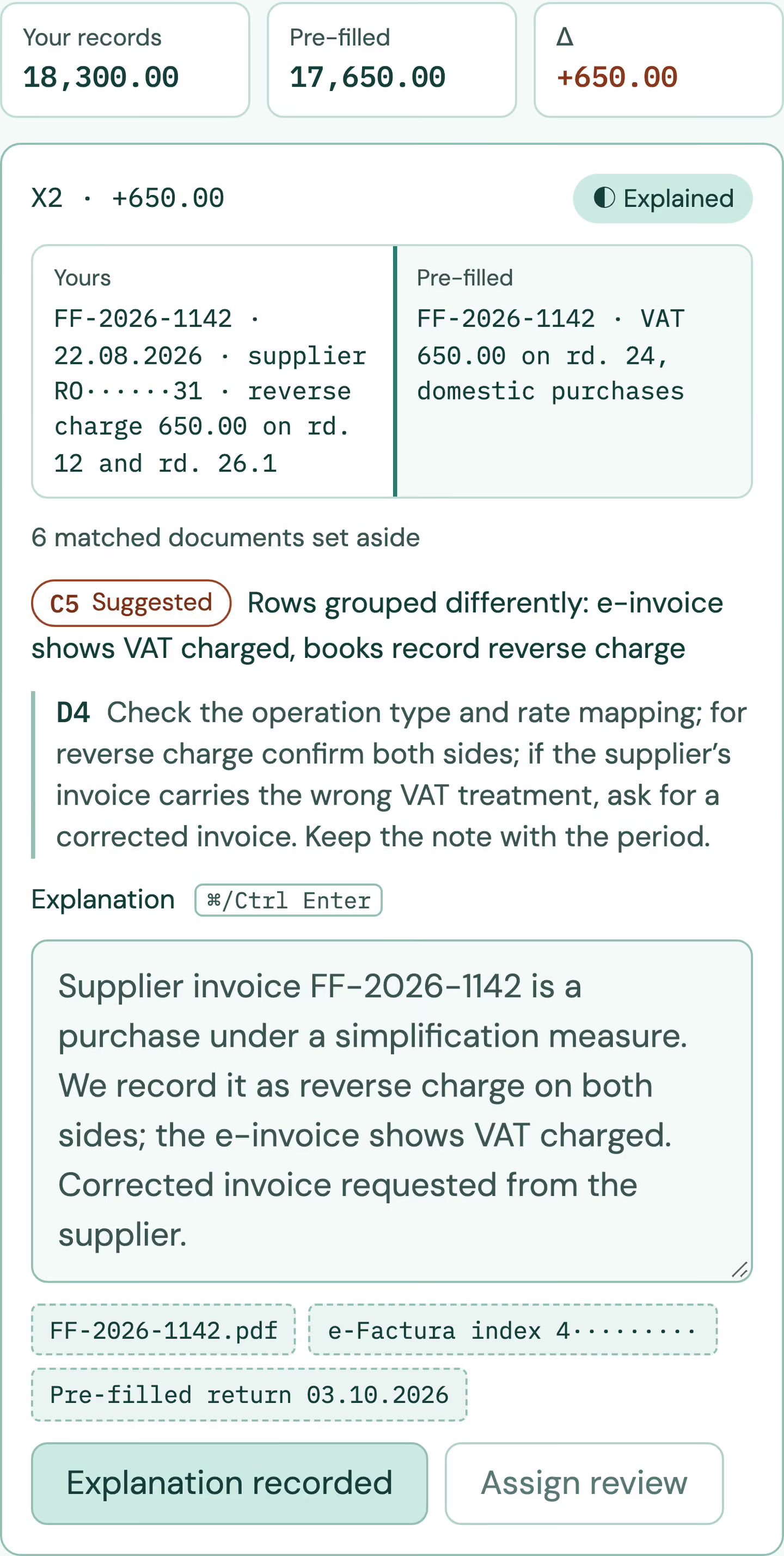
Close-up of the e-TVA drawer with example data for “rd. 12 · Reverse-charge purchases, VAT collected”, after the explanation for difference X2 was recorded: X2 is marked explained, with supplier invoice FF-2026-1142 on both sides, the suggested cause “rows grouped differently”, the explanation text and its evidence.
02 · e‑TVA · Example dataExplanation recorded. A close-up of the drawer after one explanation closes the reverse-charge difference X2, which sits on three D300 rows. The invoice from both sides, the suggested cause, the text and its evidence stay together for review.

06 / FAQ

Before your first reconciliation.

Q01 Does RDCopilot submit the D300 or answer ANAF for us?
No. The desk prepares the comparison, the explanations and the archive. Your authorised person files D300 with their qualified digital certificate and answers any ANAF request.
Q02 Our accountant already checks the pre-filled return. Why add this?
Because the check becomes repeatable and visible: the same method every month and on every CIF, with explanations someone else can follow when ANAF asks about a period months later.
Q03 We don’t use RDCopilot Accounting or ERP. Can we still use it?
Yes. We start from the CSV or XLSX journal exports of your current software and map them to the D300 rows during setup.
Q04 What if ANAF asks about a difference?
You open the archived period: both sources, each difference, its explanation, its evidence and who approved it. Your accountant uses it to answer and, where needed, carries the correction into a later D300.
Q05 Which deadlines does the desk follow?
D300 is due on the 25th of the month after the period (or after the quarter). The pre-filled return arrives by the 5th of the following month, and corrections go into a later D300. The separate e‑TVA notice and its threshold were repealed on 9 March 2026. Sources checked 7 October 2026.
Q06 Who can see our data?
The people you give access to, and our support team when you ask for help. Data is hosted in the EU. Who sees which company is agreed and set up at implementation.
Q07 What does the price depend on?
The number of CIFs, monthly or quarterly filing, and the sources to connect. You get a written quote after the scope call.
Q08 Do you cover VAT reconciliation outside Romania?
e‑TVA is built for the Romanian pre-filled return. Other countries organise digital VAT differently; tell us your case and we will say plainly whether it fits.
Your records. The pre-filled return.

We reconcile the next period with you.

From idea to implementation

Guides for your workflow